
Accounting Software
Association accounting software for French loi 1901 organisations
OPS gives French associations a complete accounting module: double-entry journals, bank statement import and reconciliation, AI-assisted supplier invoice capture, sales invoicing, nested budgets and statutory reports — General ledger, Balance sheet and Income statement — all accessible from one dashboard. Available on the Full plan.
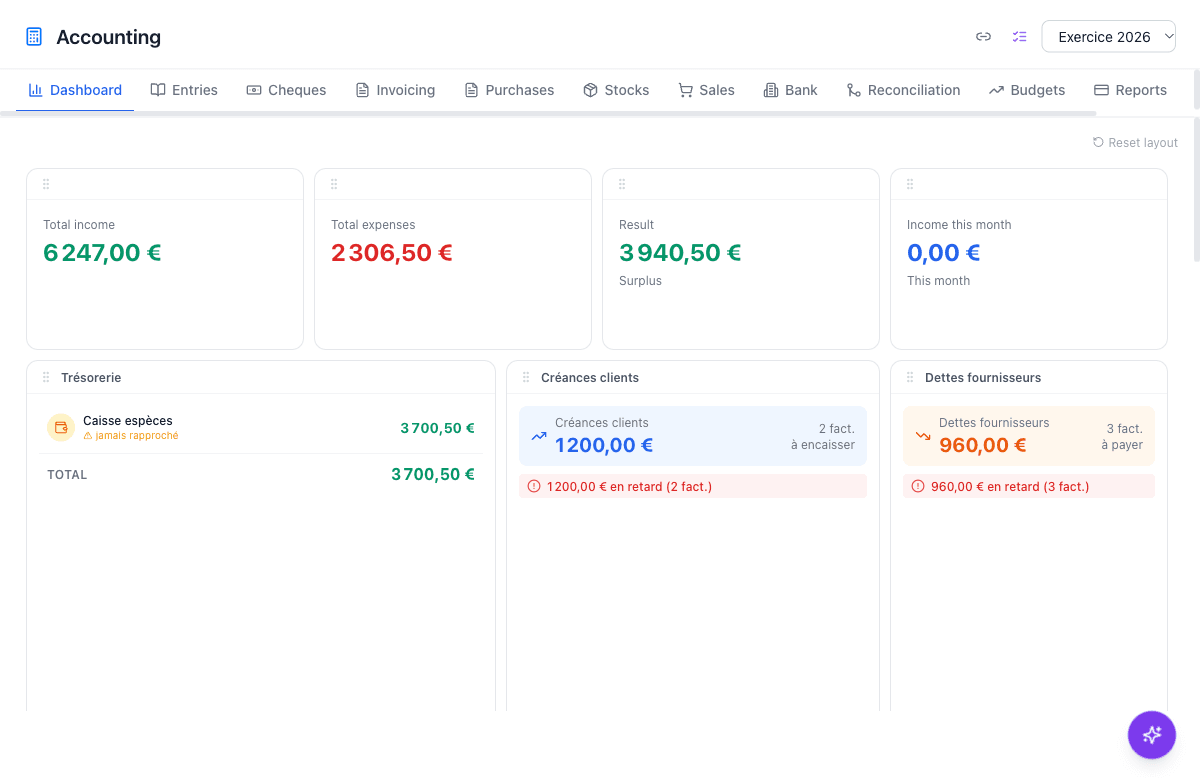
Built on the Plan Comptable Général
OPS accounting follows the French Plan Comptable Général (PCG) for associations, with the class 1–7 chart of accounts adapted to non-profit structures. Every journal entry uses double-entry bookkeeping, and the software pre-populates the association chart of accounts when you create a new fiscal year. No manual account numbering is required, and you can add custom accounts alongside the standard ones.
At year-end, a closing wizard verifies that all entries are validated, posts the closing entry for income and expense accounts (classes 6 and 7), and generates the carry-forward balances (à-nouveaux) for the new year. The FEC file (Fichier des Écritures Comptables) — required for any French accounting audit — is available in one click from the Reports tab.
Bank statement import and reconciliation
Import your bank statement as a CSV file with dedicated presets for BNP Paribas, Crédit Agricole, Société Générale and LCL, or use the auto-detect option for other formats. Crédit Mutuel PDF statements are also supported via AI extraction. Once imported, all transactions appear in the Bank tab, with duplicate lines filtered out automatically.
The Reconciliation tab displays automatic matching suggestions based on date, amount and account. You confirm each match with a single click, and the computed balance updates in real time. When it equals the statement balance, you close the reconciliation — the system records the date for audit purposes, and unmatched lines remain visible until a corresponding journal entry is posted.
AI invoices, budgets and the auditor link
In the Purchases tab, drop a supplier invoice PDF and AI reads the supplier name, date, line items and VAT, matching the vendor to your existing third-party list and assigning the correct PCG expense account. Batch scanning processes up to 50 invoices at once. A TTC/HT reconciliation banner in the capture window lets you verify the extracted totals before saving.
The Invoicing tab manages outgoing invoices with PDF generation, VAT, validation and payment tracking. Nested budgets let you plan revenues and expenses by project or season, then compare actuals against forecasts at any time. A read-only auditor link gives your accountant or auditor full access to the ledger, reconciliations and financial reports without any editing rights.
What the accounting module covers
Double-entry journal
Post entries manually or through dedicated workflows (purchases, sales, bank transfers). Every entry is validated before it affects the general ledger.
Bank import and reconciliation
Import CSV statements from major French banks or PDF statements via AI. Automatic suggestions speed up the monthly reconciliation.
AI supplier invoice scanning
Drop a PDF invoice and AI extracts the supplier, amounts and VAT lines, assigning PCG accounts automatically. Batch processing for up to 50 invoices.
Invoicing and cheques
Issue outgoing invoices with PDF, record payments and manage received and issued cheques including deposit slip PDFs.
Nested budgets
Plan revenues and expenses per project in a hierarchical structure. Track variance against actual postings in real time with per-budget drill-down.
Financial reports and FEC export
General ledger, balance sheet, income statement and FEC export in one click, formatted for French association accounting standards.
Why associations choose OPS for accounting
- Plan Comptable Général for associations built in — no manual setup required
- FEC export in one click to satisfy the French legal audit requirement
- Bank statement presets for BNP Paribas, Crédit Agricole, Société Générale, LCL and Crédit Mutuel
- AI reads supplier invoices and assigns the right expense account automatically
- Read-only auditor link — no shared passwords, no editing access
- Data hosted in France on OVH servers (Strasbourg), GDPR-compliant
Step-by-step tutorials
Frequently asked questions
Which types of associations can use the accounting module?
Any French loi 1901 association — orchestras, wind bands, choirs, music schools and youth music groups. The module follows the Plan Comptable Général for associations (classes 1–7) and is available on the Full plan.
Is the FEC export included?
Yes. The FEC (Fichier des Écritures Comptables) export is available in the Reports tab. It covers all validated entries for the selected fiscal year in the format required by French tax authorities.
Which banks are supported for bank statement import?
BNP Paribas, Crédit Agricole, Société Générale and LCL have dedicated CSV presets; an auto-detect option covers other formats. Crédit Mutuel PDF bank statements are supported via AI analysis.
Can the AI recognise my regular suppliers?
Yes. When you scan a supplier invoice, OPS searches your existing third-party list by name, company number or VAT number. A match above the confidence threshold is pre-selected in the capture window for you to confirm or change.
Can my accountant view the books without editing them?
Yes. You can generate a read-only auditor link from the accounting settings. Anyone with that link can browse the general ledger, reconciliations, balance sheet and income statement but cannot add or modify entries.
Does OPS handle cheques?
Yes. The Cheques tab manages received and issued cheques separately. You can print a deposit slip (bordereau de remise de chèques), mark a cheque as rejected and cash a received cheque to transfer it from the suspense account to your bank account.