
Communication
Member communication for orchestras and music associations
Keeping every musician, teacher and parent informed is one of the most time-consuming jobs in a music association. OPS brings all announcements, polls and notifications together in one place — so you write a message once, choose your audience, pick your channels and send, without copying and pasting across email threads, WhatsApp groups and notice boards.
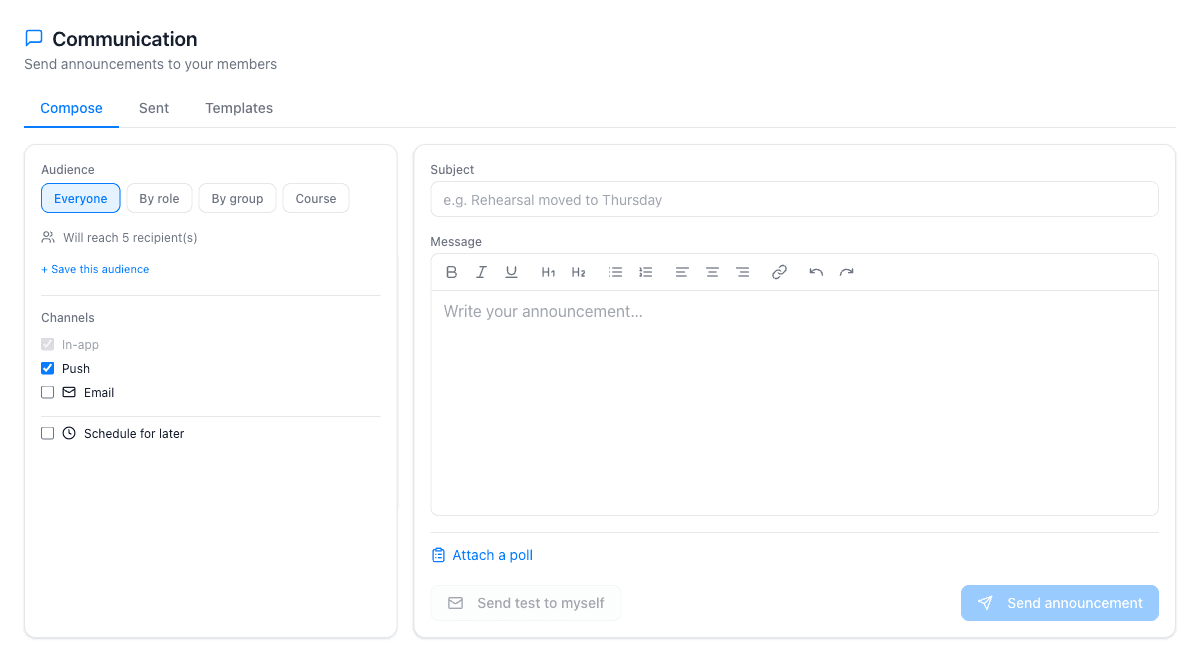
Announcements with targeted audiences
Open the Communication tab, choose an audience — everyone, by role (musicians, teachers, pupils or parents), by group, by course, or a saved custom audience — and write your message. Before you send, a recipient count shows exactly how many members will receive it. You can also schedule an announcement for a future date and time.
Three delivery channels are available for each announcement: in-app notification (visible when members log in to the web app), mobile push (sent to OPS Mobile on iPhone) and email (with an automatic unsubscribe link). You can activate any combination of channels for a single message. Read receipts and email delivery statistics are available in the Sent tab after sending.
Polls, templates and test sends
Attach a poll to any announcement to collect responses from your members: single choice, multiple choice, yes/no or free text. Responses appear in real time in the Sent tab, with a public answer page you can share with those who want to see the aggregate result. A closing date is optional.
Save frequently-used announcements as templates — rehearsal reminders, concert call sheets and similar — and load them into the Compose tab in one click. A 'Send test to myself' button lets you preview exactly how the message will look before it reaches your members. The Communication module is available on the Full plan.
What the communication module covers
Targeted audiences
Send to everyone, to a specific role (musicians, teachers, pupils, parents), to a group, to a course, or to a saved audience you define once and reuse.
In-app notifications
Announcements appear as notifications for logged-in members in the web app. Members see them at the top of every page when they are unread.
Mobile push
Members using OPS Mobile on iPhone receive push notifications immediately. No separate app to configure — the same account works on all devices.
Email with unsubscribe
Send announcements by email with an automatic unsubscribe link included. Track how many emails were delivered and how many failed in the Sent tab.
Polls
Attach a single-choice, multiple-choice, yes/no or free-text poll to any announcement. Responses appear in real time with a shareable public results page.
Scheduled sending
Write your announcement now and schedule it for a future date and time. Save reusable messages as templates to save time on routine communications.
Why associations use OPS for member communication
- Write once, send across three channels — in-app, push and email — in a single action
- Target exactly the right audience: a section, a role, a course or a saved group
- Polls collect attendance intentions, repertoire preferences or any quick question
- Scheduled announcements mean concert reminders go out automatically
- Email open rates and delivery statistics visible after every send
- No separate mailing-list tool needed — everything stays in one platform
Frequently asked questions
Which plan includes the Communication module?
Communication is available on the Full plan (from €30/month for organisations). It is not included in the Free or Standard plans.
Can I send a message to just one group or section?
Yes. In the Audience field select "By group", then choose the group you want to reach. You can also combine audiences or save a custom audience to reuse across multiple announcements.
Does OPS send SMS messages?
No. OPS does not send SMS. Messages are delivered in-app, by mobile push to OPS Mobile users and by email.
Can parents receive announcements?
Yes. If the School module is active and parents have accounts through the parent portal, you can select the Parents role as your audience. Parents receive announcements in their portal and as push notifications on OPS Mobile.
Can I use it as a newsletter tool?
The Communication module sends targeted announcements to existing members of your association. It is not a newsletter tool for external subscribers — it requires a platform account to receive in-app and push messages.
How do read receipts work?
After sending, the Sent tab shows each announcement with read and email delivery statistics. For email, you can see how many were sent and how many failed. In-app read status is tracked per member.