
Choir Management Software
One platform to manage your choir
OPS brings together everything a choir needs to run smoothly: a searchable digital score library, voice-section organisation through member groups, concert setlists your singers can access on iPad, member records and the association's accounts. Whether you run a small amateur choir or a large choral society, OPS keeps your librarian, conductor and treasurer working from the same shared platform.
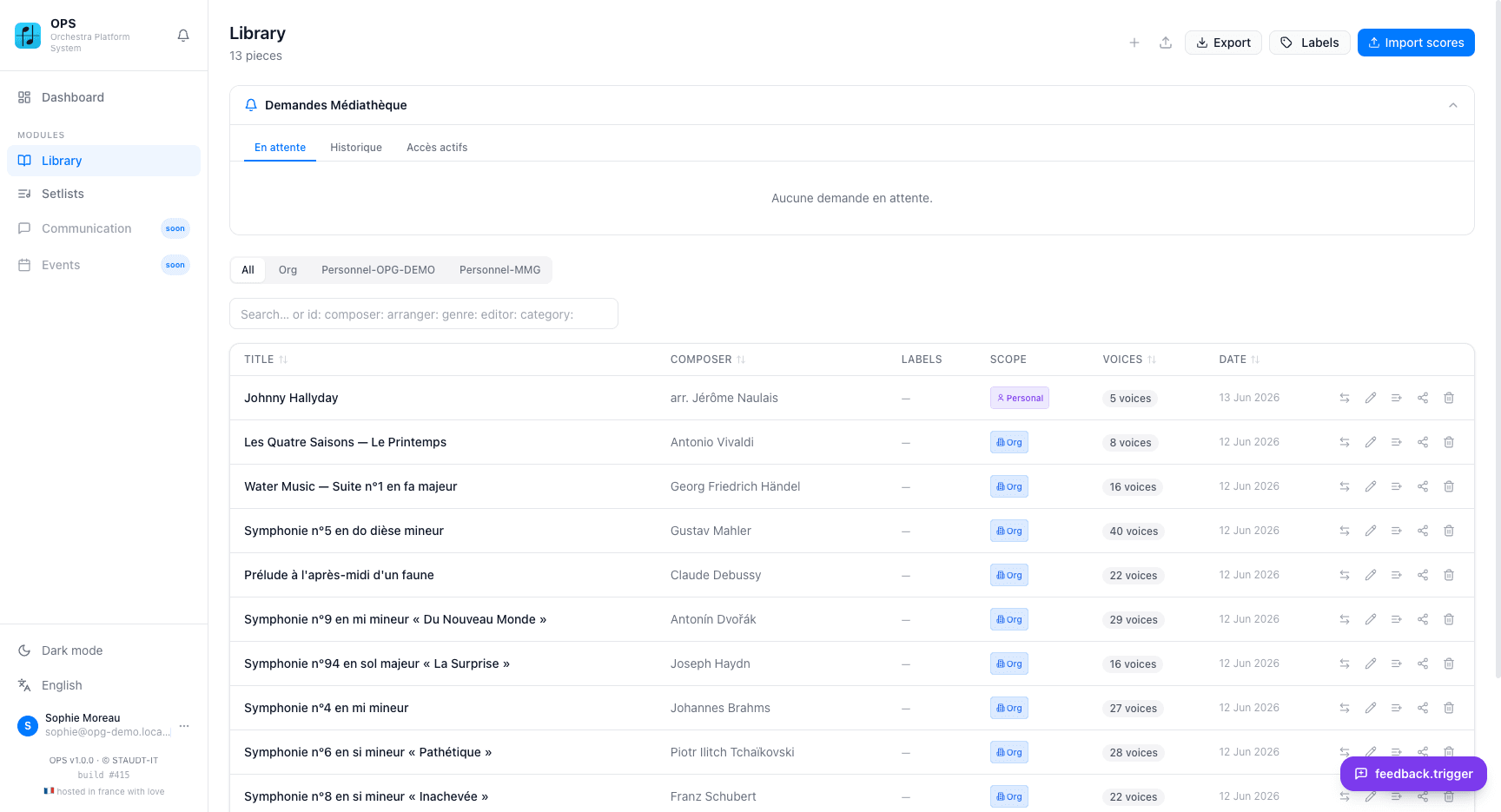
Digital score library for choirs
Upload your choral scores as scanned images or PDFs. If your parts are printed separately per voice, the scanned pages go through a review screen that marks where each part starts, so you end up with one PDF per voice. A choral score with all voices together simply stays one PDF that every singer receives. PDFs that are already split receive voice-name suggestions from the AI. A single PDF containing all parts gets a page-range split proposal with editable boundaries. Once imported, every score is tagged with title, composer, arranger, genre and difficulty, ready to search in seconds.
Voice sections in OPS are handled through member groups. Create a group for each voice — Soprano, Alto, Tenor, Bass — and assign singers to their group. For a concert, you assign the singers to the setlist and they get its scores in the web app and on iPad; a single voice can also be sent on its own with a share link. A ZIP of all parts is one click away for the whole choir or for a single voice. The OPS Scores iPad app lets singers read their parts offline and annotate with Apple Pencil during rehearsals.
Concert setlists and programme sharing
Setlists work well for choral concerts. Add pieces, set the order, link the concert date and assign your singer groups. Each singer sees only their voice's parts. The public setlist link lets the audience browse the programme — no account needed. For sheet music with piano accompaniment, you upload both the vocal score and the accompanist's part as separate voices in the same piece.
Sharing an individual piece generates a public link valid for a configurable period. Anyone with the link can preview and download the parts you choose to share — useful for distributing sight-reading material before a rehearsal or sharing a score with a guest singer. The Mediathek lets your singers request access to a score or a single voice from your library; you approve and can revoke access at any time.
Member management and association accounts
The member directory stores contact details, roles, voice group and account access for every singer. Import your existing list from an Excel spreadsheet using the provided template in one step. Custom fields let you record additional information — audition date, voice type, emergency contact or anything specific to your choir. The member list can be exported as PDF or Excel for the committee. Communication tools let you send messages to the whole choir or to a specific voice section.
For choirs that manage their own accounts, the accounting module follows French association accounting standards (Plan Comptable des Associations) with a double-entry journal, bank reconciliation, supplier invoices and year-end closing. The treasurer can import bank statements, scan receipts and produce the balance sheet and income statement for the annual general meeting — all without any external software.
Everything your choir needs
Score library with AI import
Upload scans or PDFs; separately printed voice parts are split into one PDF per voice. Searchable by title, composer, genre, difficulty and more. ZIP export for complete scores.
Voice sections via member groups
Create a group per voice part (Soprano, Alto, Tenor, Bass) to organise singers, lists and announcements. Singers assigned to a setlist get its scores.
Concert setlists
Build concert programmes, assign singer groups and share the public setlist. OPS Scores (iPad) lets singers read offline with Apple Pencil annotations.
Share scores and programmes
Share any score by public link or QR code — no account for recipients. Share the concert programme publicly. Singers request scores via the Mediathek.
Member directory
Contact details, voice group, roles and account access for every singer. Import from Excel. Custom fields. Export as PDF or Excel for the committee.
Association accounting
Double-entry journal, bank reconciliation, budgets and year-end closing for French associations. Import bank statements and scan supplier invoices.
Why choirs use OPS
- Separately printed voice parts are split into one PDF per voice
- Voice sections organised as member groups, for lists, exports and announcements
- OPS Scores (iPad) is offline-first — singers read their parts anywhere
- Share scores and concert programmes by link or QR code without an account
- Member records, communication and accounting all in the same platform
- GDPR-compliant, hosted in France on OVH servers in Strasbourg
Step-by-step tutorials
Frequently asked questions
How does OPS handle voice sections (soprano, alto, tenor, bass)?
Voice sections are managed through member groups. You create a group for each voice — Soprano, Alto, Tenor, Bass — and assign singers to it. Setlists are assigned to singers individually: everyone assigned to a setlist gets its scores. To send one voice only, share that single part with a link.
How do I import our choral scores?
Upload scanned images (JPEG or PNG) or PDFs via the Import scores screen. Scanned pages of separately printed voice parts go through a review where each part's start is marked; a score with all voices together stays one PDF. PDFs already split per voice get AI name suggestions. A single PDF with all parts gets a split proposal with editable page ranges. You can also import a ZIP of folders (one folder per piece, one PDF per voice) to import several pieces at once.
Can singers access their parts offline on iPad?
Yes. The OPS Scores iPad app caches each singer's setlist parts and personal pieces for offline use. Apple Pencil annotations — pen, highlighter and eraser — are personal and sync to their account. Concert mode shows all pieces in the programme in full-screen order without needing to navigate menus.
How do I share the concert programme with the public?
Make the setlist public to generate a shareable link or QR code. Anyone can open the public page in a browser without an account — it lists all pieces in the programme order. You can display this on a screen at the venue or link to it from your website.
Does OPS include a way to import existing member data?
Yes. OPS provides an Excel import template. Fill it with your existing data, upload it via Administration and all members are imported in one step. You can then assign singers to their voice group directly from the member list.
Can I use OPS if our choir manages its own accounts?
Yes, with the Full plan. The accounting module follows the French Plan Comptable des Associations with a full double-entry journal, bank reconciliation, budget tracking and year-end closing. Note that this follows French association accounting standards — it is suited to choirs registered in France and not to German accounting standards such as SKR or DATEV.
Is there a free plan for smaller choirs?
Yes. The Free plan includes 20 pieces per organisation, 3 setlists and 2 user accounts — suitable for a small choir to get started with digital scores. The Standard plan adds unlimited pieces and setlists, full member management and instrument inventory. The Full plan adds accounting and the music school module.
Related solutions
Try it with your ensemble
Start with the free plan — no credit card required.
Start managing your choir — free