
Document Management
Document management software for music associations
OPS Documents gives your association a central archive for every file it produces or receives: membership contracts, loan agreements, insurance certificates, meeting minutes, correspondence and more. Each document gets a permanent archive number, an AI-generated summary and an optional QR-code label. Secretaries, treasurers and administrators can find any file in seconds. Available on the Full plan.
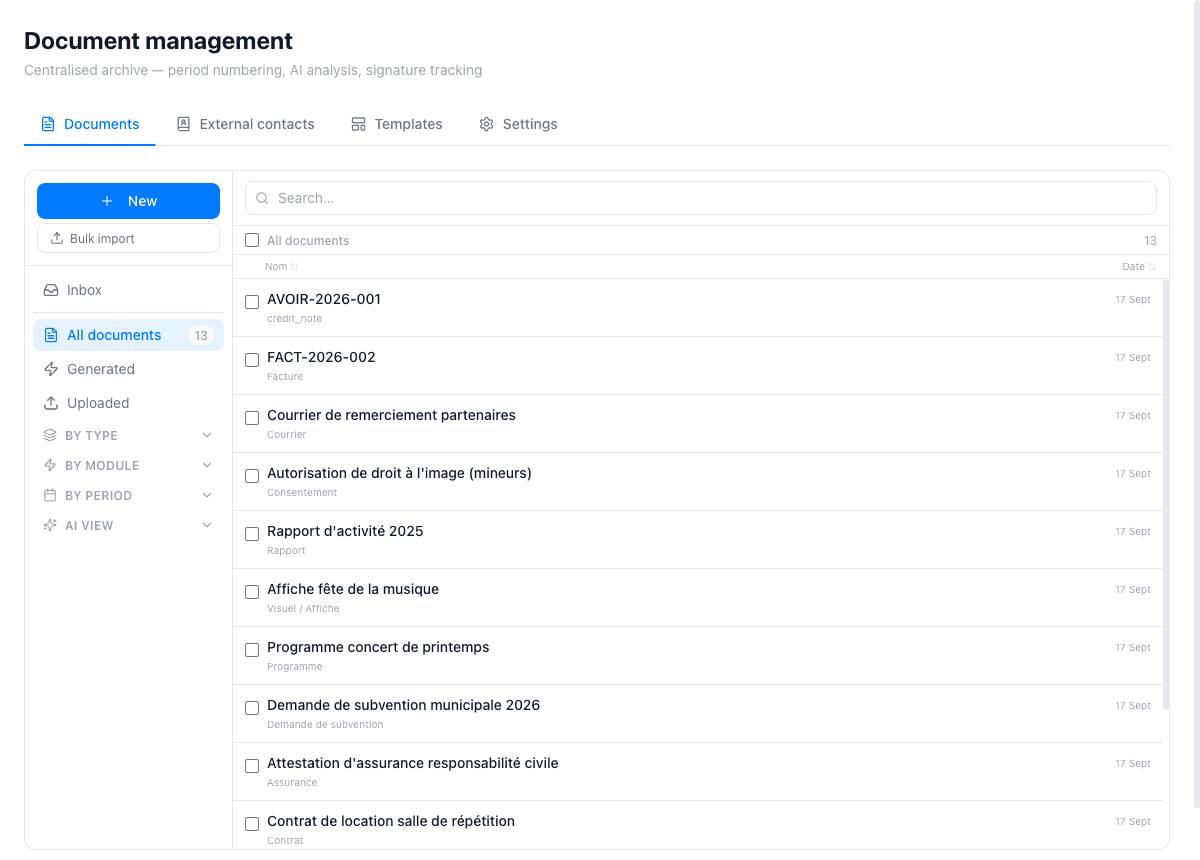
A central archive with automatic numbering
Every document finalised in OPS receives a unique, permanent archive number. The number is stamped on the document itself via a printable QR label, so a physical copy filed in a binder can be scanned back to the digital original at any time. Documents generated by other modules — invoices, loan contracts, repair reports — land in the archive automatically.
The document list can be filtered by type, module, period or status (Draft, Final, Signed, Archived). A full-text search covers document titles, correspondent names, dates and AI-generated summaries, so you can find a three-year-old insurance certificate or a specific meeting minute in a few keystrokes.
AI analysis and bulk import
When you upload a file, AI reads it and suggests the document type, date, correspondent and a plain-text summary. You review the suggestions in the Inbox, correct anything that needs adjusting, and then finalise the document — assigning its archive number at that moment. The AI reorganise function re-classifies all documents of a given type at once.
Bulk import lets you drop up to 100 files in a single operation. The AI processes each one and places it in the Inbox for review. This is especially useful when migrating paper archives or when a batch of scanned documents arrives after an event or a season.
Templates, signature tracking and QR labels
DOCX and ODT document templates with merge fields let you generate standard documents — enrolment contracts, loan agreements, official letters — pre-filled with member, instrument or school data from the platform. Templates are managed centrally and can be updated in one place for the whole organisation.
OPS tracks whether a document has been signed: you upload the signed copy and the status changes to Signed. This is signature tracking, not electronic signing — the signed PDF is stored in the archive exactly as returned by the recipient. Print a QR label (compatible with Dymo or Brother label printers) to attach a permanent link to the physical original.
What the document management module covers
Upload and organise
Upload single files or batches of up to 100 at once. Filter by type, module, period or status. Full-text search across titles, correspondents and AI summaries.
AI classification
AI reads each uploaded file and suggests type, date, correspondent and a plain-text summary. Review in the Inbox and finalise with one click.
Automatic archive numbers
Each finalised document receives a permanent, unique archive number. Numbers are stamped in the PDF and printed on QR labels for physical filing.
QR labels
Print a QR-code label for any finalised document. Scanning the label opens the digital original for anyone with access to the platform.
DOCX and ODT templates
Generate standard documents from templates with merge fields pre-filled from member, school or instrument data. Manage templates centrally for the whole organisation.
Signature tracking
Upload a signed copy of a document to mark it Signed. The original and the signed version are stored side by side in the archive.
Why associations choose OPS for document management
- Permanent archive numbers and QR labels link physical and digital copies
- AI reads uploaded files and suggests type, date and correspondent automatically
- Bulk import of up to 100 files in a single operation
- Templates in DOCX and ODT with merge fields from member and school data
- Documents generated by other modules land in the archive automatically
- Data hosted in France on OVH servers (Strasbourg), GDPR-compliant
Step-by-step tutorials
Frequently asked questions
What types of documents can I store in OPS Documents?
Any file type you can upload: PDFs, scanned images, DOCX and ODT files. Typical documents include membership contracts, instrument loan agreements, insurance certificates, meeting minutes, subsidy applications and correspondence.
Does the AI classification replace a human review?
No. The AI suggests type, date, correspondent and a summary, but everything is reviewed in the Inbox before being finalised. You correct any field before assigning an archive number.
Does OPS support electronic signatures?
No. OPS provides signature tracking only: you upload the PDF that was signed and returned by the other party, and the document status changes to Signed. There is no integrated e-signing service.
How many files can I import at once?
The bulk import accepts up to 100 files in a single operation. For larger migrations, you can repeat the operation in batches.
Are documents generated by other modules (invoices, contracts) stored here automatically?
Yes. Invoices generated in the Accounting module, loan contracts from the Instruments module, and other generated documents land in the document archive automatically, with the appropriate type and links to the related record.