
Instrument inventory
Instrument inventory software for orchestras and bands
Every wind band, orchestra or music school has instruments that are lent to members, sent for repair and occasionally lost or damaged. OPS keeps a complete record of each instrument — serial number, condition, photos, loan history and maintenance — and lets you generate a loan contract and print a QR label in a few clicks.
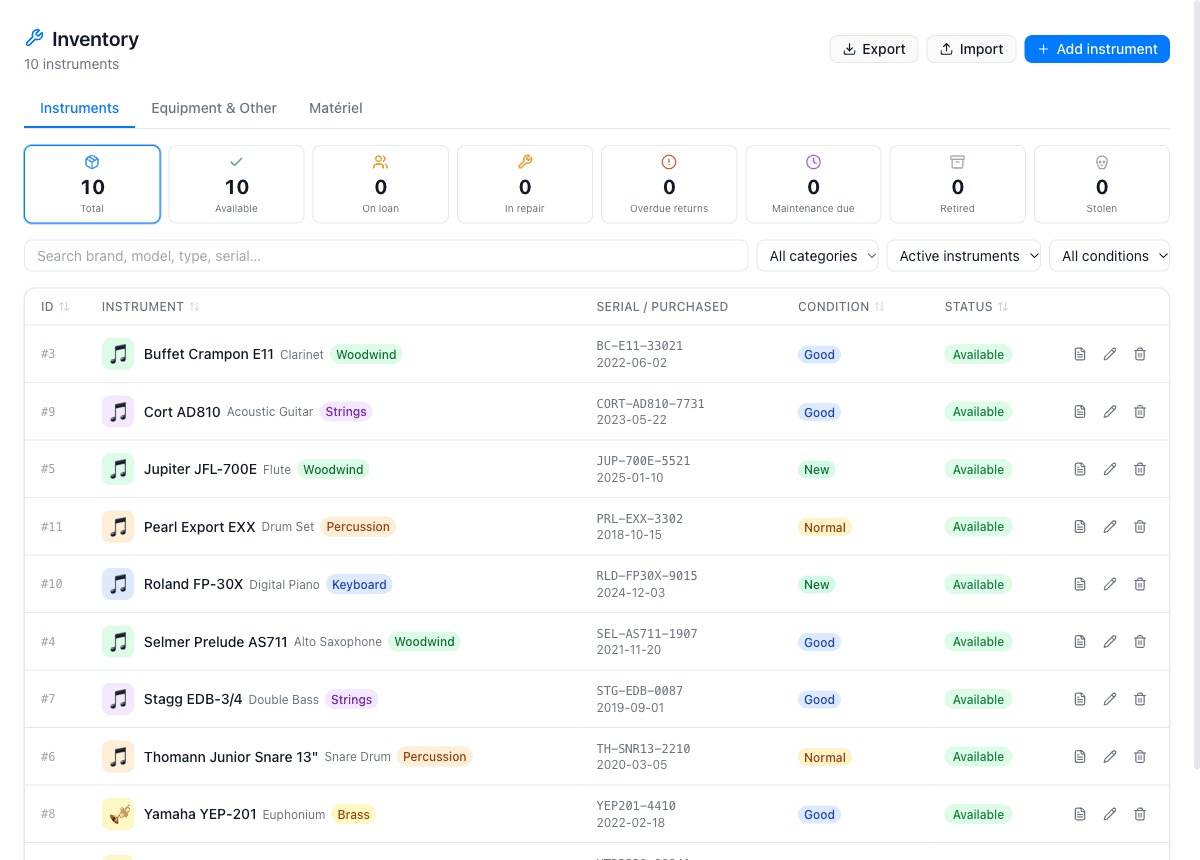
A full register of your instrument fleet
Open the Inventory section and add each instrument with its brand, model, serial number, purchase date and estimated value. Assign a category (Brass, Woodwind, Percussion, Strings, Keyboard or Other) and note its current condition. You can also record storage location — room and shelf position — so volunteers can find instruments without asking the librarian every time.
Custom fields let you track anything specific to your organisation: insurance policy number, acquisition source, colour marking, or whether a case is included. Every instrument has a dedicated page with a Timeline tab showing every loan, repair and incident in chronological order.
Loans, rentals and contracts
Creating a loan takes seconds: choose the borrower from your member list (or enter an external person), set the start date, and OPS generates a loan contract PDF ready to print, download or send by email. If the borrower returns the instrument, you record the return condition, add photos and the timeline updates automatically. A QR label can be printed on a Dymo or Brother label printer; anyone who scans it sees the instrument's availability and current borrower.
Instruments can also be rented at a monthly price. OPS will create a draft invoice in the accounting module when you start a rental — useful for music schools that charge families a monthly rental fee. A waiting list per instrument type ensures that when an instrument becomes available, you know who to contact next.
Repairs, incidents and maintenance
Log a repair with the date, repair cost and service provider — and upload the repair report PDF when it comes back. Incidents (damage, missing accessories) are recorded separately so they stay visible on the timeline. You can set a maintenance interval in months; the instrument's page reminds you when the next service is due.
The Equipment & Other tab covers everything that is not a traditional instrument: stands, sound-protection muffs, microphones, amplifiers and any other items your group owns. Each equipment item gets its own record with photos, incidents, repairs and assignment history, plus an automatic inventory number (EQ-0001, EQ-0002…) for easy reference.
What the instrument inventory covers
QR labels
Print a QR label on a Dymo or Brother printer. Scanning it shows availability and the current borrower — login required for full details.
Loan contracts
Generate a loan contract PDF for each loan. Download it, print it, or send it by email. Upload the signed copy when it comes back.
Repairs and maintenance
Record every repair with date, cost and repairer. Set a maintenance interval so nothing falls overdue without a reminder.
Waiting list
When all instruments of a given type are lent out, members can join a waiting list. You see who is next when one becomes available.
Equipment & Other
Stands, cases, microphones — every item that is not a traditional instrument gets its own record, photos and assignment history.
Full search and filters
Search across all instruments by type, category, status or condition. Filter to see only what is currently available or out on loan.
Why instrument librarians choose OPS
- No more spreadsheets — every instrument, loan and repair in one searchable register
- Generate a loan contract PDF and print a QR label in under two minutes
- Know at a glance which instruments are available, on loan or in repair
- Loan history and condition photos protect both the borrower and the association
- Equipment items such as stands and microphones tracked with the same tool
- Waiting lists ensure fair access when demand exceeds supply
Step-by-step tutorials
Frequently asked questions
Which plan includes instrument inventory?
Instrument inventory is available on the Standard plan and above for organisations. The Standard plan costs €20 per month and includes unlimited instruments, loans and repairs.
Can I generate a loan contract automatically?
Yes. Once you create a loan, OPS generates a PDF contract. You can download it, print it, or send it to the borrower by email directly from the app. When the signed copy comes back, you upload it and it stays attached to the loan.
How do the QR labels work?
Each instrument has a unique QR code in the QR / Label tab. Print it on a Dymo 36x89 mm or Brother 62x50 mm label and stick it on the case or the instrument. Anyone who scans the code sees the instrument's availability and current borrower; a login is required to access full details.
Can members see which instruments are available?
Any member with a login can scan a QR code or check the instrument's page in OPS to see its current status. The waiting list feature lets them register interest when all instruments of a type are already on loan.
Is equipment such as music stands included?
Yes. The Equipment & Other tab handles any item that is not a traditional instrument — stands, sound protectors, microphones, amplifiers and so on. Each item gets photos, incidents, repairs and an automatic inventory number.
Can I import an existing instrument list?
You can use the mass import tool (Administration, Standard plan) to import instruments from an Excel file using the provided template. Individual instruments can always be added one by one through the Inventory menu.