
Sheet Music Management Software
The complete platform for digital sheet music management
OPS transforms how orchestras and music schools manage scores. Scan the separate parts of a piece and OPS finds where each instrument part starts and saves one PDF per part. Every part is ready to search, share, assign to a setlist and read on iPad — offline, with Apple Pencil annotations.
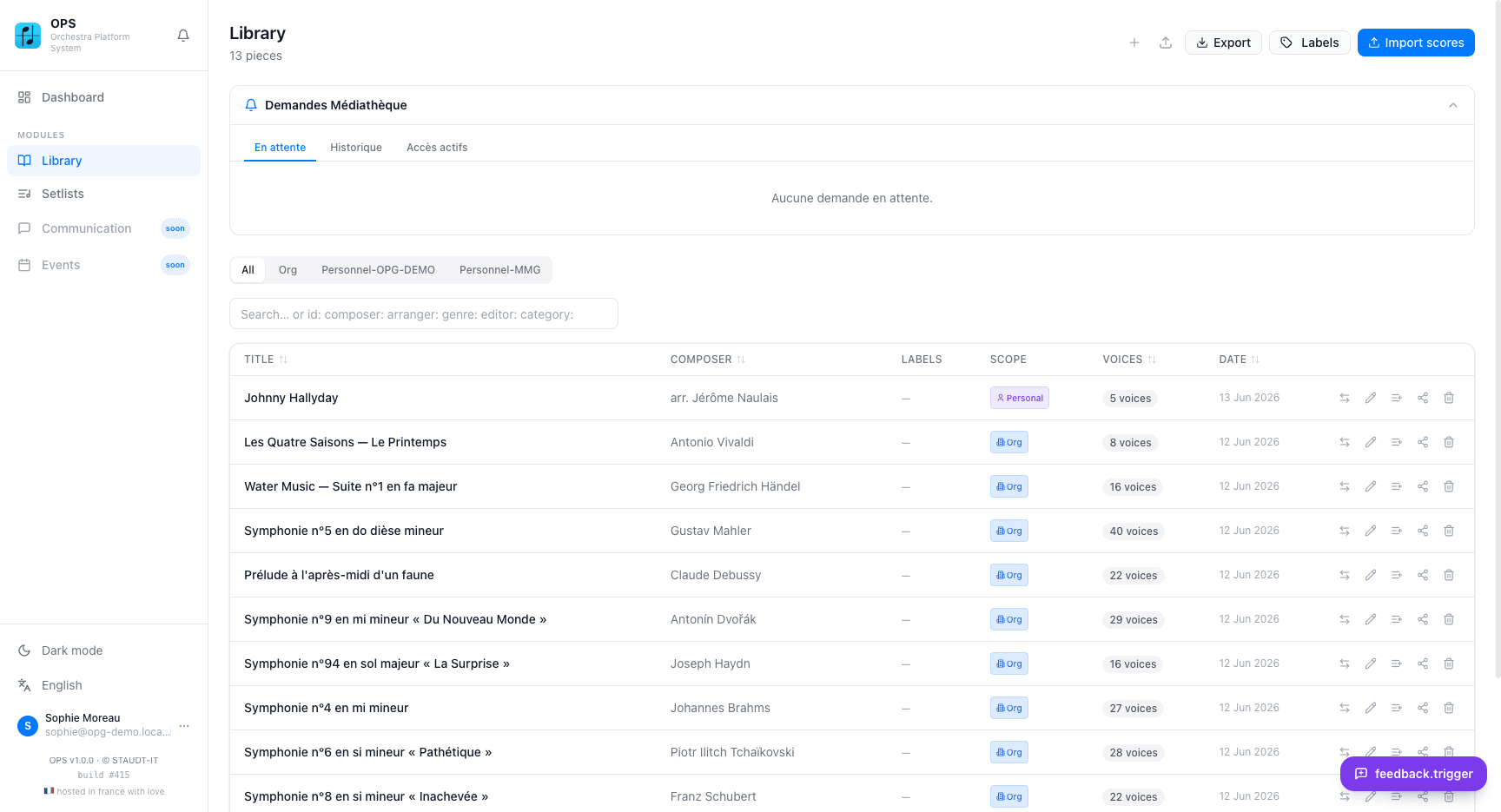
Import, organise and share your score library
Upload scanned images (JPEG or PNG) and OPS uses AI to identify where each instrument part starts and ends, splitting the scan into individual PDFs in a review screen where you can merge pages, rename voices and correct any mistake. PDFs that already contain one part per file receive AI-assisted voice-name suggestions from page one, matched against the 48-instrument catalogue. A single PDF holding all parts gets a split proposal with editable page ranges — up to 300 pages — and an accepted split produces one PDF per instrument.
The library organises pieces by title, composer, arranger, genre, archive number, difficulty and more. Coloured labels, free-text search and prefix searches (composer:, genre:, category:) let you find any piece in seconds. Each musician can also keep a personal library for private pieces that never appear in the organisation's catalogue. ZIP export and catalogue export as CSV, Excel or PDF are available on the Standard plan.
The OPS Scores iPad app
OPS Scores (iPad) is an offline-first score reader. Administrators have the entire library available offline; musicians automatically download their assigned setlist parts and personal pieces. A banner shows when the app is checking the library for updates. Apple Pencil support includes pen, highlighter and eraser with adjustable size and colour — annotations are personal and non-destructive, layered on top of the original PDF which is never modified.
Concert mode presents all pieces in the setlist in full-screen order so you step through the entire programme without navigating menus. Bluetooth page-turn pedals (AirTurn, PageFlip) are supported: next page on Space, right arrow or Page Down; previous on left arrow or Page Up. Half-turn mode splits the screen with a draggable line for reading wide spreads. Per-page zoom and rotate are saved as your personal view for each page — other musicians keep their own crops.
Sharing and access control
Sharing a piece generates a public link with configurable validity — default 7 days, or never-expiring — that anyone can open without an account to preview and download the selected voices. The link can also be shared as a QR code and shown on a screen. For setlists, the public page lists all pieces with per-instrument ZIP download. Sharing does not require any OPS account for the recipient.
The Mediathek works inside your organisation: members browse the library and request access to a piece or a single voice; an administrator approves or rejects each request, and approved members find it under My accessible scores. Access can be revoked at any time. To send music to someone outside your organisation — another ensemble, a guest player — create a share link instead: no account is needed to download.
Everything for your score library
Import that splits your scanned parts
Scanned pages of your parts are split per instrument on a review screen (no extraction from a conductor's score). PDFs receive voice-name suggestions; one multi-part PDF gets a page-range split proposal.
Organised library
Tag scores by composer, genre, difficulty and more. Coloured labels and prefix searches. Personal and organisation-wide libraries. Catalogue export as PDF, Excel or CSV.
OPS Scores — iPad app
Offline-first score reader with Apple Pencil annotations (pen, highlighter, eraser), concert mode, Bluetooth pedal support and per-page personal zoom and crop.
Public sharing by link and QR
Share any piece or voice by public link or QR code with configurable expiry. Recipients need no account. Per-instrument ZIP download included.
Mediathek — access requests
Members request a piece or a single voice from your library. Administrators approve, reject or revoke — per member.
Setlists and concert mode
Create concert setlists, assign musicians to give them access to their parts, and enter concert mode for a distraction-free full-screen programme on iPad.
Why orchestras use OPS for sheet music
- Replace paper archives with a searchable digital library accessible from any device
- OPS recognises where each scanned part starts and which instrument it is
- OPS Scores (iPad) is offline-first — no Wi-Fi needed on stage
- Apple Pencil annotations are personal and sync automatically to all your devices
- Share any piece by public link or QR code — no account needed for recipients
- Free plan includes 20 pieces and 3 setlists to get started
- GDPR-compliant, hosted in France on OVH servers in Strasbourg
Step-by-step tutorials
Frequently asked questions
How does score import and part splitting work?
You upload scanned images (JPEG or PNG) or PDFs. Scanned page images of your separate parts go through a review screen where OPS marks where each part starts and which instrument it is (it does not extract parts from a conductor's score) — you can merge pages, start a new voice or rename before confirming. PDFs that are already split receive AI-assisted voice-name suggestions. A single PDF with all parts gets an AI split proposal with editable page ranges per instrument.
What file formats does OPS accept?
OPS accepts PDF files and JPEG or PNG images. You can also upload a ZIP archive containing one folder per piece (each with one PDF per voice) to import several pieces in one batch. The OPS Scores iPad app has a built-in camera to scan paper scores directly and send them to the library.
Can I share scores with musicians who do not have an OPS account?
Yes. Generating a share link creates a public URL — with a default 7-day validity, configurable or never-expiring — that recipients can open in any browser without logging in. They can preview voices and download a ZIP of all parts. The link can also be displayed as a QR code.
What annotation features does the iPad app offer?
OPS Scores (iPad) supports Apple Pencil with pen, highlighter and eraser tools, adjustable size and colour. Annotations are personal and non-destructive — the original PDF is never modified. All annotations sync to your OPS account and are visible on the web under My notes. Per-page zoom and rotate are also saved as a personal view.
Does the iPad app work without internet?
Yes. OPS Scores is offline-first. Administrators have the full library cached; musicians have their setlist parts and personal pieces downloaded automatically. Once cached, every score, annotation and personal crop works with no internet connection — ideal for rehearsal rooms and concert halls.
Can I share scores with other ensembles?
Yes, with a share link. You select whole pieces or single voices and OPS creates a link that recipients open without an account to download the parts (valid 7 days by default, configurable) — you can also send it by email. The Mediathek, by contrast, is for your own members to request access inside your organisation.
What is the difference between the Free and Standard plans for sheet music?
The Free plan covers 20 pieces per organisation and 3 setlists, suitable for getting started. Standard adds unlimited pieces and setlists, mass import, ZIP exports, catalogue export and up to 40 members. The OPS Scores iPad app is available from the Free plan.
Related solutions
Try it with your ensemble
Start with the free plan — no credit card required.
Start your digital score library — free