
Setlists
Concert setlists — build, share and assign in one place
A setlist in OPS is an ordered list of pieces drawn from your score library. You can share it publicly with anyone via a link or QR code for the concert programme, and you can assign specific musicians to the setlist so they see only their parts. On the iPad, OPS Scores has a concert mode that turns your device into a hands-free music stand for the performance.
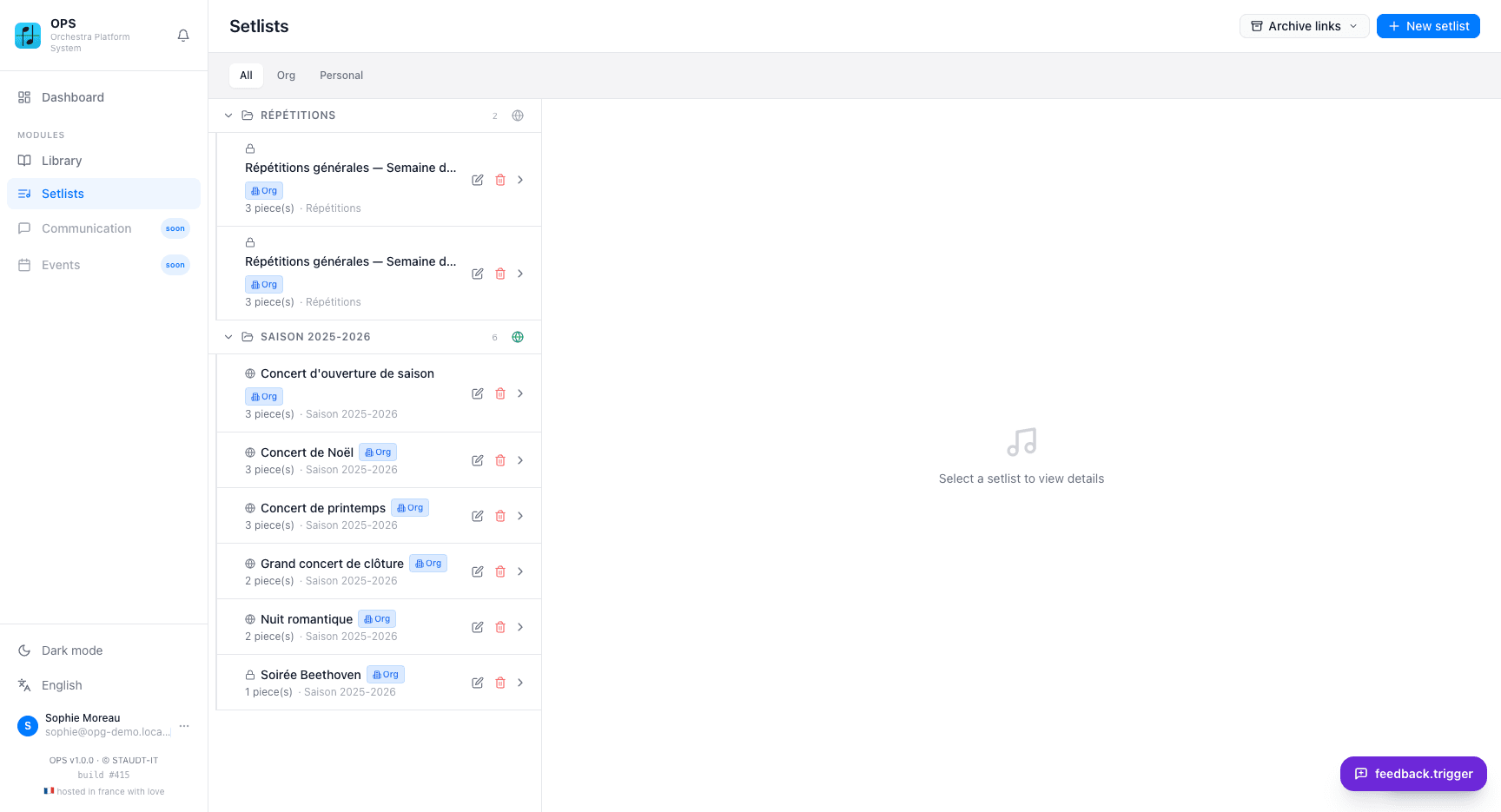
Build and organise your concert programme
Open the Setlists tab and create a new setlist. Add pieces from your library in the order they will be performed — drag them to reorder or remove them. If your pieces carry tempo markings, the total duration is calculated automatically. Setlists can be private (visible only to logged-in members) or public (anyone with the link can view the programme).
Each piece in the setlist shows its voices, duration and composer information as stored in your library. You can have as many setlists as you need — separate ones for the spring concert, the summer tour and the rehearsal room. Setlists are available from the Free plan.
Share a programme and assign musicians their parts
Click 'Make setlist public' on any setlist, choose how long the public link stays valid (a fixed number of days, or never expires), and confirm. The resulting link and QR code open a clean programme page showing the pieces in order, which anyone can view without logging in. Hand out the QR code in the concert hall or print it on a flyer.
For logged-in musicians, use 'User access' to assign members to the setlist. An assigned musician sees only the voices in their own parts — the setlist becomes their personalised digital music folder. From OPS Scores on iPad they can open those voices directly, annotate them with Apple Pencil and start concert mode for a hands-free performance.
What setlists let you do
Ordered programme
Build a concert programme from your library, reorder pieces by drag and drop, and see the total duration calculated automatically from tempo data.
Public link and QR code
Make a setlist public and share its link or QR code. Anyone can open the programme without an account. Set a validity period or let the link never expire.
Print-ready QR
Download the QR code for the programme to print on concert programmes, posters or a screen in the entrance. The public view works on any phone browser.
Assign musicians their parts
Assign members to a setlist so each musician sees only their own voices. They download or view their parts directly, without browsing the full library.
Concert mode on iPad
OPS Scores on iPad opens the assigned voices and offers a concert mode for hands-free page turning. Annotate parts with Apple Pencil before the performance.
Private or public
Keep a setlist private for logged-in members only, or make it public for the audience and families. Toggle between the two at any time.
Why orchestras and bands use OPS setlists
- The concert programme is always up to date — change a piece and the public link updates instantly
- Musicians receive their parts without you emailing PDFs — they open OPS Scores and find them ready
- Print one QR code on the programme and every audience member can see the full setlist on their phone
- Setlists are available from the Free plan — no paid subscription required for basic use
- Concert mode on iPad turns every musician's tablet into a hands-free music stand
- Duration is calculated automatically so you know if the programme fits the time slot
Step-by-step tutorials
Frequently asked questions
Which plan includes setlists?
Setlists are available from the Free plan. The Free plan allows up to 3 setlists. Standard and Full plans have unlimited setlists.
Can the public view my setlist without logging in?
Yes. When you make a setlist public, anyone with the link or QR code can view the concert programme without creating an account. The public page shows the piece titles, composers and durations.
How do I share the QR code?
Click 'Make setlist public', set the validity period and confirm. A QR code image appears that you can download and print on your concert programme, posters or a projected slide in the entrance hall.
Can I generate a programme PDF to print?
OPS does not generate a formatted programme PDF. The public setlist page is designed for screen sharing and QR-code distribution. You can export the piece list and compose your own printed programme.
How do musicians access their parts from a setlist?
Assign a member to the setlist using the 'User access' button. They log in to the web app or open OPS Scores on iPad — the setlist appears in their view with only the voices assigned to them. They can download or annotate those parts directly.
Can a setlist link expire?
Yes. When making a setlist public, choose a validity period in days or select 'Never expires (unlimited)'. After the validity period the link stops working, which is useful for one-off concert programmes.
Does OPS Scores concert mode work with setlists?
Yes. In OPS Scores on iPad, a musician opens their assigned setlist and starts concert mode. The app displays each voice in order, turns pages automatically or on a pedal tap, and keeps the screen on throughout the performance.