
iPad App
The iPad app for reading and annotating sheet music
OPS Scores is the dedicated iPad app for musicians and orchestras using the OPS platform. Open your assigned parts offline, annotate every page with an Apple Pencil, and walk on stage with your entire setlist full-screen in Concert Mode. All scores sync automatically from the web app — no cables, no manual transfers.
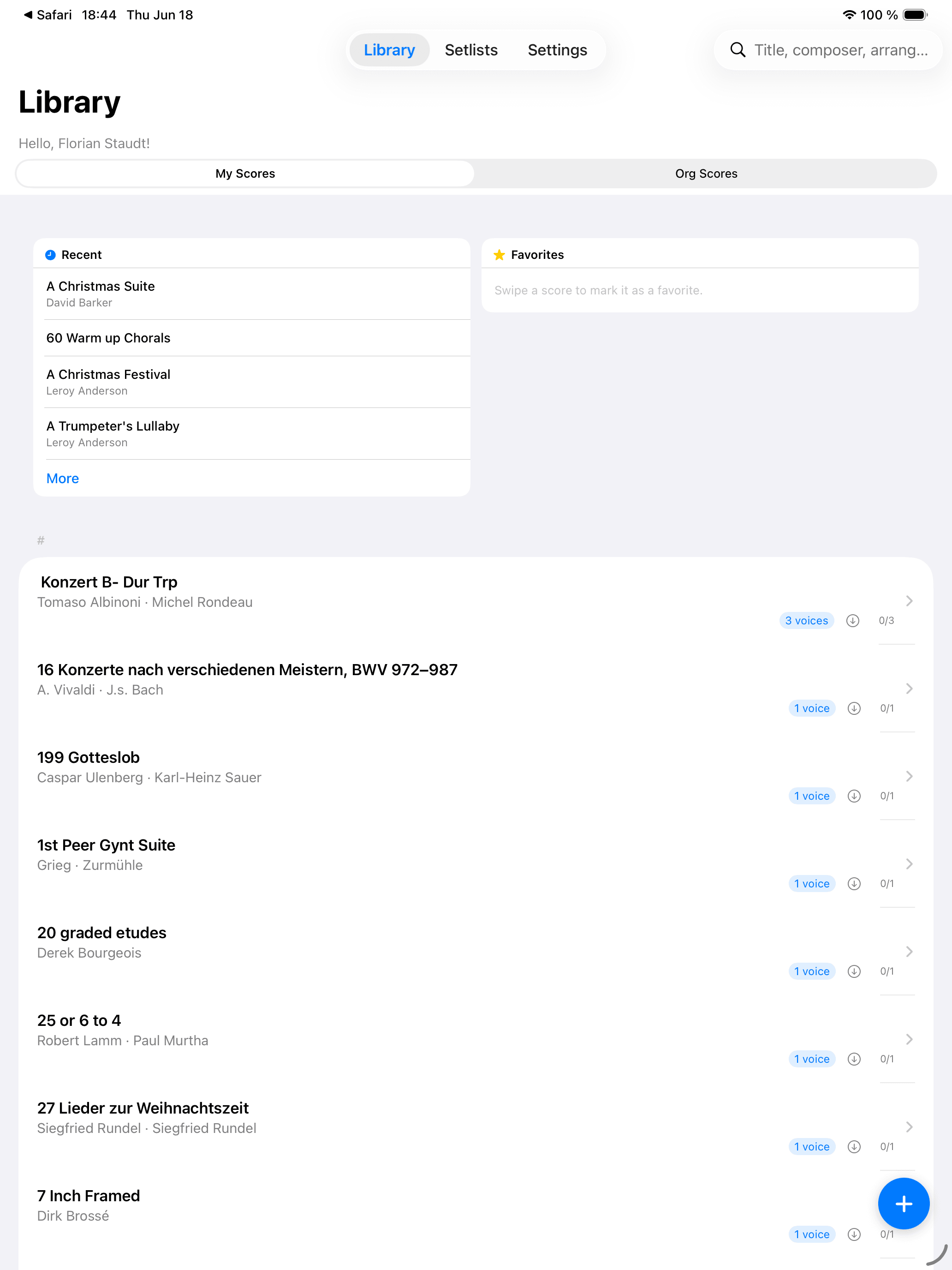
Scores on your iPad, always up to date
When you open OPS Scores, the app checks the server and downloads anything new — a banner reads "Checking the stand..." while it works. Admins get the full score library cached offline; musicians receive their assigned setlist parts and personal pieces. After that first sync, every score is available without any internet connection, including in the concert hall.
Setlists you build in the web app appear on the iPad after a sync. You can also create, rename, reorder and delete setlists directly on the device. Pieces imported or updated in the web library are picked up automatically. Your personal per-page zoom and rotation settings travel with the score so you never need to adjust the same page twice.
Annotate with Apple Pencil, turn pages hands-free
Touch any page with your Apple Pencil and the annotation toolbar appears. Choose pen, highlighter or eraser, pick a colour and adjust the stroke width, then draw directly on the score. Annotations are personal — other musicians never see them — and they sync back to your account. By default the Pencil draws and a finger turns pages; tap the toolbar icon to let your finger draw too.
For hands-free page turns, pair any Bluetooth HID pedal — AirTurn and PageFlip are supported — through the iPadOS Bluetooth settings. The right footswitch advances the page, the left goes back. "Half Turns" splits the screen to show the bottom of the current page alongside the top of the next, giving you time to prepare each turn. The split line can be dragged to match your pace.
Concert Mode and display options
From any setlist, tap "Start Concert Mode" to open all pieces full-screen in order, with no menus in the way. Tap anywhere, swipe, or press a pedal to advance. "Play from here" lets you jump to any piece mid-setlist without leaving Concert Mode. A built-in metronome with tap tempo helps you set the opening pace of each movement.
Night mode, contrast and brightness sliders let you read scores in any lighting — from a bright rehearsal room to a dark stage. Scroll Mode removes individual page turns so you glide continuously through a score. The camera scanner (using the iPad's built-in camera) can capture a paper part on the spot and send it straight to your library.
Everything you need on stage
Full offline access
Assigned parts and personal scores are cached on the device. Admins have the complete library available without any internet connection.
Apple Pencil annotations
Pen, highlighter and eraser on every page. Personal annotations sync to your account and survive PDF replacements in the revision history.
Concert Mode
One tap launches all pieces in a setlist full-screen and in order. "Play from here" lets you start at any piece without breaking the flow.
Bluetooth page-turn pedal
Connect an AirTurn or PageFlip pedal through iPadOS Bluetooth settings. Hands-free page turns throughout the performance.
Display and reading options
Night mode, contrast, brightness, per-page zoom and rotation. Half Turns shows the next page before you lift your bow. Scroll Mode for uninterrupted reading.
Library access and requests
Browse the shared score library, request access to a piece or a single voice, and track your approved grants — all from the app.
Why musicians choose OPS Scores
- No paper parts: every voice is on the iPad, stamped with the organisation name and a QR code that links back to the piece.
- Annotations survive updates — when a PDF is replaced, your notes from the previous version are kept in the revision history.
- Setlists built in the web app appear on the iPad after a sync; changes on the iPad sync back automatically.
- Concert Mode eliminates last-minute page-flip stress and lets you focus entirely on the music.
- Offline access means rehearsals can continue even with no Wi-Fi in the rehearsal room or concert venue.
- The metronome with tap tempo eliminates the need for a separate device at the stand.
Step-by-step tutorials
Frequently asked questions
Does OPS Scores work on iPhone?
OPS Scores is iPad-only. OPS Mobile, the companion app for iPhone, also includes a PDF score viewer for reading parts on the go.
Are annotations visible to other musicians?
No. Annotations are personal and private to your account. They sync across your own devices but are never shared with other users, even if you are all reading the same org score.
Which Bluetooth pedals are compatible?
Any standard Bluetooth HID foot pedal works, including popular models from AirTurn and PageFlip. Pair the pedal in iPadOS Bluetooth settings before opening the app. There is no remapping UI in OPS Scores — the right pedal always advances, the left pedal always goes back.
Can I add scores directly from the iPad?
Yes. You can scan paper pages with the iPad camera, import a PDF from Files or your photo library, and save it as a personal piece or — if you have admin rights — to the organisation's library.
What happens if I lose my internet connection mid-rehearsal?
All synced scores remain fully accessible offline. New pieces and updates are downloaded the next time the app opens with a connection available.
Is the app included in the free plan?
Yes. OPS Scores is available on every plan, including the Free plan. You need an OPS account linked to an organisation to access org scores; personal pieces work on any account.
Are scores protected from screenshots?
Yes. Score screens are hidden from iOS screenshots and screen recordings to help protect licensed material.