
Room booking
Room booking software for music schools and associations
Music schools and larger associations often struggle with room conflicts: two teachers book the same rehearsal room, a student session overlaps a committee meeting, or a room sits unused because nobody knew it was free. OPS gives every member a live availability view so they can request a room themselves, while administrators keep full control by approving or declining bookings and setting each room's opening hours.
Set up your rooms and opening hours
In the Rooms section, click "New Room" to add each room with its name, capacity, location and a description of its features (piano, audio system, chairs and so on). Each room has its own availability schedule: choose from preset templates such as Business Hours (Mon-Fri 08:00-17:00), Music School (Mon-Sat 13:00-20:00) or a custom schedule by day. You can save a custom schedule as a template and reuse it for other rooms.
The availability calendar gives administrators a day-level overview of every room — which slots are booked, which are free and which are outside the room's opening hours. Rooms used for school lessons are linked to the school module: their bookings appear here but cannot be edited from the Rooms section directly.
Search, book and manage bookings
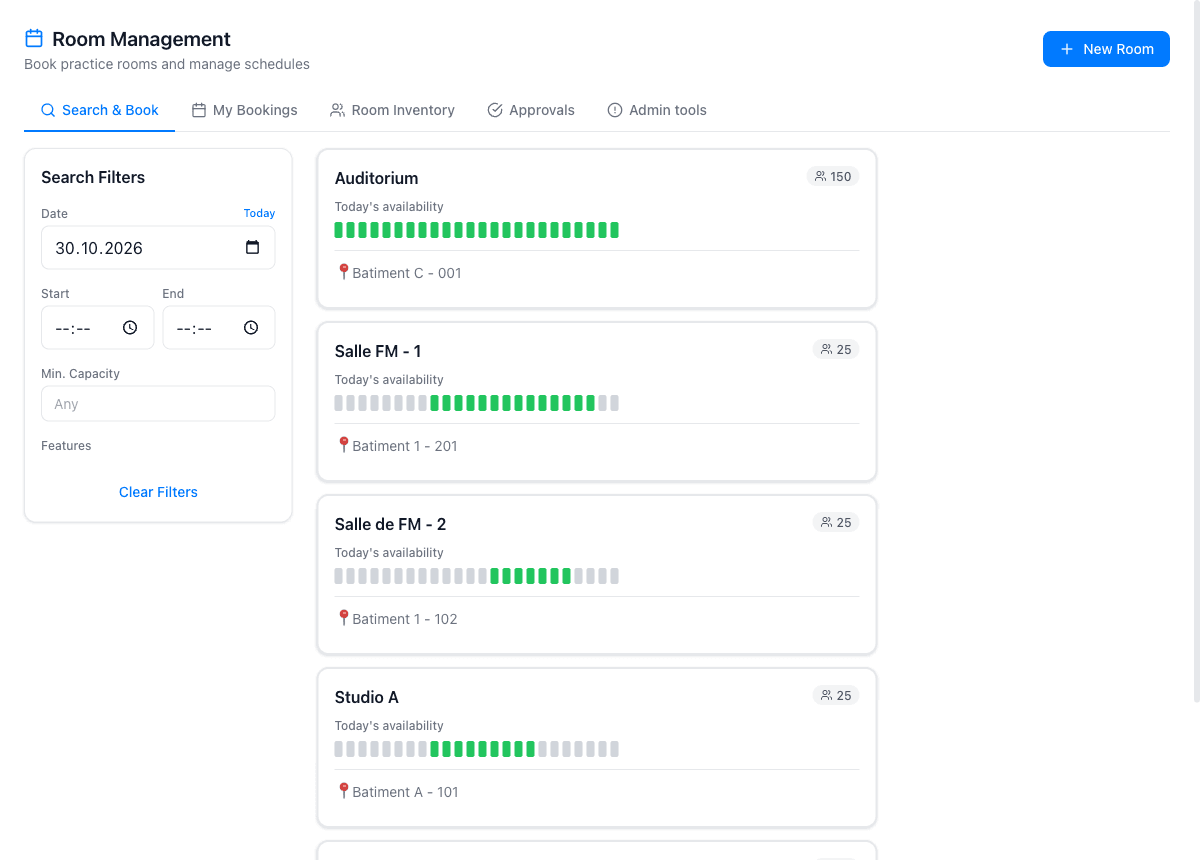
Members with the "book" permission go to "Search & Book", pick a date and time range, optionally set a minimum capacity, and see a list of available rooms. After choosing a room, they enter a title and optional notes, then click "Confirm Booking". If the room requires approval, the booking is pending until an administrator accepts or declines it.
Each member can view all their own bookings in "My Bookings". The dashboard widget shows upcoming bookings at a glance and a quick link to book a room. Administrators can search all bookings across every room, see today's availability at a glance, and manage recurring bookings — useful for weekly rehearsal slots that repeat for an entire semester.
Recurring bookings and conflict detection
Recurring bookings let you reserve a room for a repeating pattern — for example every Tuesday evening for the wind band rehearsal. OPS checks each occurrence against existing bookings and flags any conflicts before confirming, so there are no surprises mid-semester. School sessions are also conflict-checked when a teacher assigns a room to a recurring course.
The booking confirmation PDF gives the member a printable record of their reservation. Room booking is part of the Full plan for organisations; individual accounts do not have access to this module.
What the room booking module covers
Room catalogue
Create rooms with name, capacity, location and features. Each room has its own availability schedule with per-day time slots.
Live availability search
Members search by date, time and minimum capacity. Rooms that are booked or outside opening hours are excluded automatically.
Booking approval
Admins approve or decline booking requests. Members see their booking status in My Bookings and on the dashboard widget.
Recurring bookings
Reserve a room for a repeating weekly or biweekly slot. OPS checks each occurrence for conflicts before confirming.
School integration
Rooms linked to school courses show their sessions in the room calendar, with conflict detection when a teacher assigns a room.
Booking confirmation PDF
Every confirmed booking can generate a PDF confirmation for the member to keep as a printable record.
Why music schools use OPS for room management
- No more double-bookings — live conflict detection prevents two sessions claiming the same room
- Members book rooms themselves rather than calling or emailing an administrator
- Per-room opening hours ensure bookings stay within realistic use windows
- Approval workflow keeps administrators in control without becoming a bottleneck
- School lessons and member bookings share the same availability view
- Available on the Full plan for organisations — no separate system to integrate
Frequently asked questions
Which plan includes room booking?
Room booking is part of the Full plan for organisations (€30 per month). It is not available on the Standard plan or for individual accounts.
Can I control who is allowed to book rooms?
Yes. Access is controlled by the "book" permission level. You can grant it to individual users or to a group. Users with read-only access can see availability but cannot make a booking.
Can I set different opening hours for each room?
Yes. Each room has its own availability schedule with one or more time slots per day. You can apply a preset template (Business Hours, Music School, Extended Hours, 24/7) or set custom hours per day and save them as a template for other rooms.
How does the approval workflow work?
When a member submits a booking request, it appears as pending for the administrator. An admin can then approve or decline it. The member sees the updated status in their My Bookings view and on the dashboard widget.
Are school lesson rooms managed here too?
School sessions can be assigned a room using the room picker in the school module's course schedule. Those bookings appear in the room's availability calendar and are taken into account for conflict detection, but they cannot be edited from the Rooms section directly.
Can members book rooms on a mobile phone?
Yes. Room booking is also available in OPS Mobile (iPhone), which is included in the Full plan. Members can search available rooms, make a booking and view their upcoming reservations from their phone.