
Member management
Member management software for music associations
Running a music association means keeping track of dozens — sometimes hundreds — of musicians, teachers, pupils, parents and volunteers. OPS gives you a single, searchable roster with roles, groups, account invitations and custom fields, so your committee spends less time on admin and more time making music.
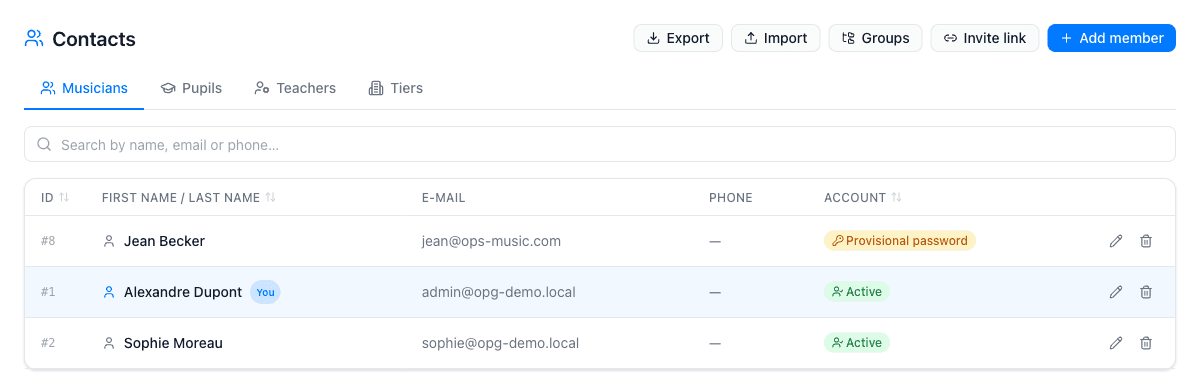
Roles, groups and contact details
Every person in OPS has a role: musician, teacher, pupil, volunteer or admin. You group members however your association works — by section, by ensemble or by age — and nest groups inside each other for fine-grained organisation. Each record holds name, address, phone, email, date of birth and a member-since date, plus any custom fields your committee defines.
Custom fields (text, number, date, yes/no or dropdown) let you track anything specific to your association: instrument owned, subscription status or any other detail that matters to you. Custom fields and the Excel import are available from the Standard plan.
Accounts, invitations and access control
Send each member an invitation by email: they receive a link, choose their own password and join the platform in seconds. If you prefer a self-registration flow, generate a seven-day, single-use invite link and share it by any channel you like. Platform access can be disabled at any time without deleting the record.
Permissions are set per module — library, accounting, school, rooms and more — and can be applied to an individual member or to an entire group. This means your treasurer sees the accounting module, section leaders see their group's files, and rank-and-file members see only what they need.
Import, export and the OPS Mobile app
If you already have a roster in a spreadsheet, download the built-in Excel template, fill in your data and import it in one step. The member list exports to PDF, Excel or CSV at any time, filtered by group if needed — useful for your annual general meeting, insurance provider or mailing list.
Members with an active account can use OPS Mobile on iPhone to check their profile, scan instrument QR codes and receive push notifications from the Communication module. Everything they need is available offline once synced.
What the member management module covers
Roles and groups
Assign each member a role (musician, teacher, pupil, volunteer, admin) and organise them into nested groups by section, ensemble or any structure you choose.
Invitations and accounts
Send email invites or generate a seven-day self-registration link. Members set their own password and you can revoke access at any time.
Custom fields
Add text, number, date, yes/no or dropdown fields to member records to track subscription status, instrument owned or any information specific to your association. Standard plan.
Excel import
Load your existing roster from an .xlsx or .xls spreadsheet using the built-in template. No need to re-enter data you already have. Standard plan.
Export (PDF, Excel, CSV)
Download your full roster or a filtered group as a PDF, Excel spreadsheet or CSV file at any time, including all custom fields.
Per-module permissions
Control which members or groups can access each module — library, accounting, school, documents and more — without sharing everything with everyone.
Why music associations choose OPS for their members
- One roster for musicians, teachers, pupils and parents — no duplicate spreadsheets
- Invite a new member by email in seconds; they set their own password
- Custom fields track subscription status, instrument owned or any detail specific to your association
- Group musicians by section and target communications precisely with the Communication module
- Export the full roster to Excel, PDF or CSV for your AGM, insurer or mailing list
- Access controls keep sensitive data such as accounting away from those who do not need it
Step-by-step tutorials
Frequently asked questions
What plan do I need to manage members?
Basic member records (name, contact details, roles) are available on every paid plan. Custom fields and the Excel import require the Standard plan (from €20/month). Group-filtered exports are also available from Standard.
Can I import my existing member list?
Yes. Download the Excel template from the Members page, fill in your data and upload it. The import supports .xlsx and .xls files. OPS will create or update each record from the spreadsheet.
How do I invite a member to the platform?
Open the member record and click "Invite link". The member receives an email with a link valid for seven days; they choose their own password. You can also generate a self-registration link to share by any channel you prefer.
Can I manage pupils and teachers as well as musicians?
Yes. OPS has built-in roles for pupils and teachers alongside musicians and volunteers. The School module (Full plan) adds enrolments, courses, grades, lesson schedules and the parent portal.
How many members can I manage?
The Standard plan supports up to 40 members. The Full plan supports up to 100 members and pupils combined. Individual accounts have their own limits.
Can I restrict what each member can see?
Yes. Permissions are set per module and can be applied to an individual member or to an entire group. For example, only your treasurer needs access to the accounting module.
Is there a member photo?
Member photos are not stored in OPS at this time. You can use a custom field to record any additional identifier you need.